Your current WordPress website is the starting point. First review how many pages can move and which design fits. After your approval, Unplio builds a separate website for you to try. When you are satisfied, activate a subscription and connect your own domain.
A managed website means Unplio handles hosting, HTTPS, technical care and publishing. You manage the content in the platform. Your existing website stays online throughout preparation. Below, explore the trial, everyday editing and ongoing care after the switch.
How the 14-day free trial works
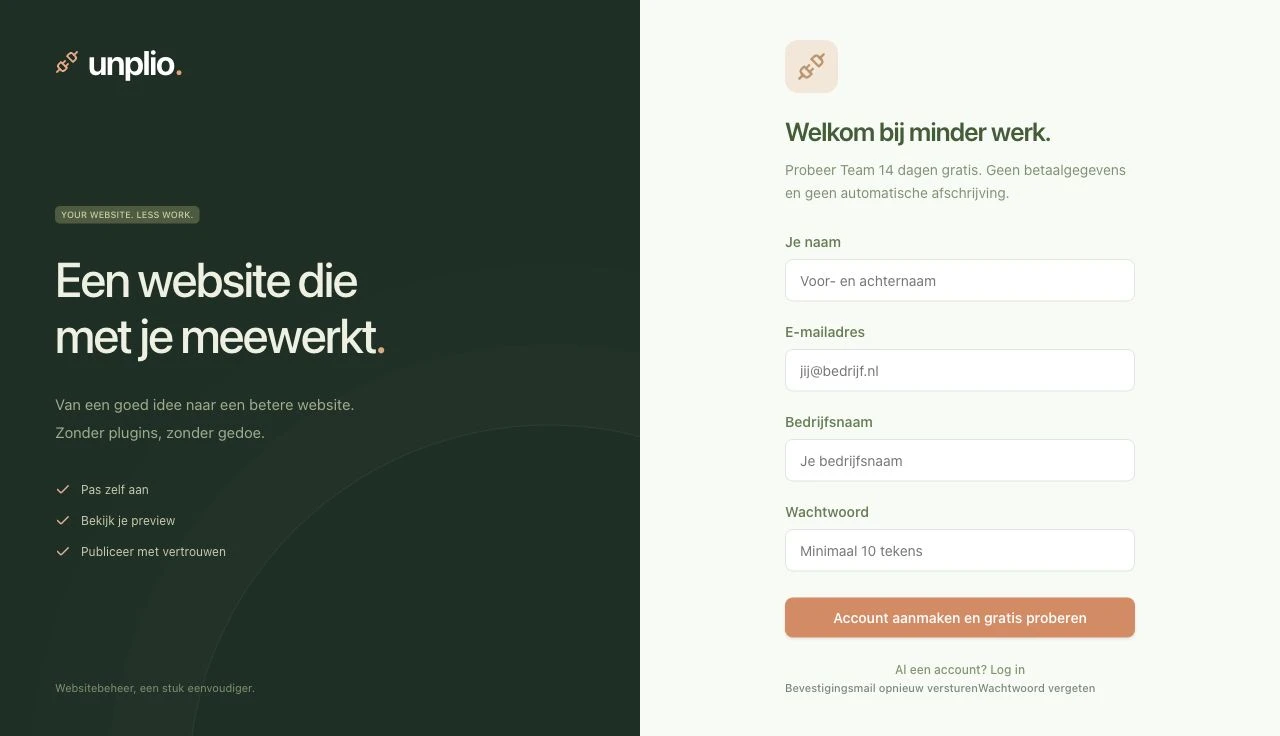
Create your account and verify your email
Choose a plan to explore and sign up with your name, email address, company name and password. Verify your email, then open your own workspace. You do not need payment details to try Unplio. The trial does not automatically turn into a paid subscription.
Review your page count and design first
Enter your existing website address and confirm that you may migrate it. Unplio inventories public pages, identifies readable content and reports duplicate or inaccessible URLs separately.
Review an Astro design based on the colours and components found on your source website. Check desktop and mobile, choose your design and select pages. Only after your approval do we import the selected content and supported images and build your private website. Your 14 days start when the built preview is ready.
The trial imports up to 50 pages. For a larger site, select 50 pages to try or activate Team or Business first. Simple contact forms are recognized automatically. Standard contact forms and the enquiries inbox are included in every plan. Complex forms, webshops, bookings and external integrations are reported before approval and assessed separately.
What is included in the trial?
- One private trial site: explore and edit in a protected workspace.
- 20 AI requests for the whole trial: one shared allowance for those 14 days, rather than a daily or monthly allowance.
- Contact forms and a test inbox: submit your form and view the test enquiry in Unplio. Testing sends no real email.
- An editor, preview and change history: try the workflow before deciding on your move.
- A deliberate decision to go live: publishing requires an active, paid subscription.
If you use the AI allowance while your trial is still active, you can continue editing text fields manually. After 14 days, editing pauses; your saved draft and previews remain available. There is no automatic charge. When you want to continue, you activate your subscription yourself through Stripe.
From testing forms to real enquiries
Under Enquiries > Forms and recipient, check the fields and recipient email. Your verified account address is the default recipient; verify any other address by email. Trial and preview submissions are saved as tests only. After payment and publication, real enquiries arrive in your inbox with email notifications and retries. Administrators can read and handle enquiries.
Editing your website with AI, step by step
Select the page you want to work on
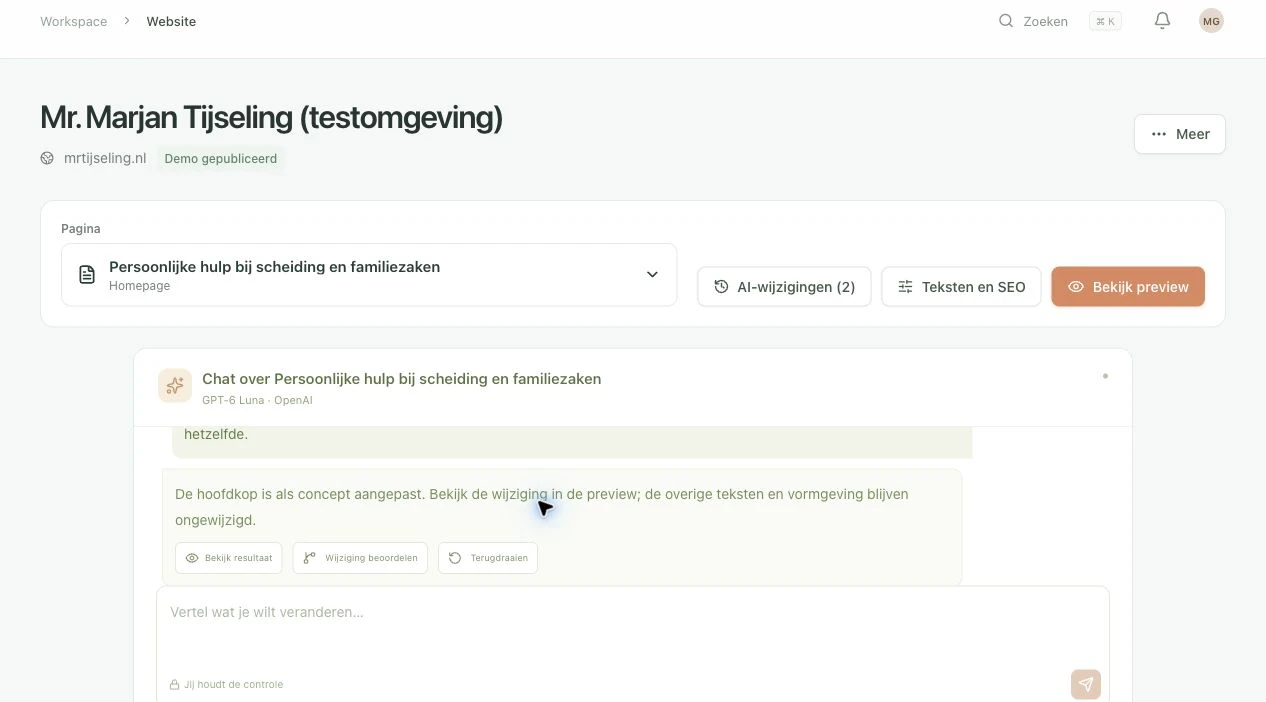
Open Website and choose a page. The chat and AI change history belong to that selected page, keeping a homepage update separate from work on your contact page. You can also open Text and SEO to edit the fields directly.
Give a focused instruction in your own words
A useful first request is: “Make only the main heading clearer. Keep its meaning and leave the rest of the page unchanged.” You can also ask for a shorter paragraph or a better search description based on your existing content.
The assistant uses the selected page as context and prepares a draft change. If the request is unclear, it can ask for clarification first. Review the content yourself: you remain responsible for prices, names, commitments and other facts published on your website.
Check the result in the preview
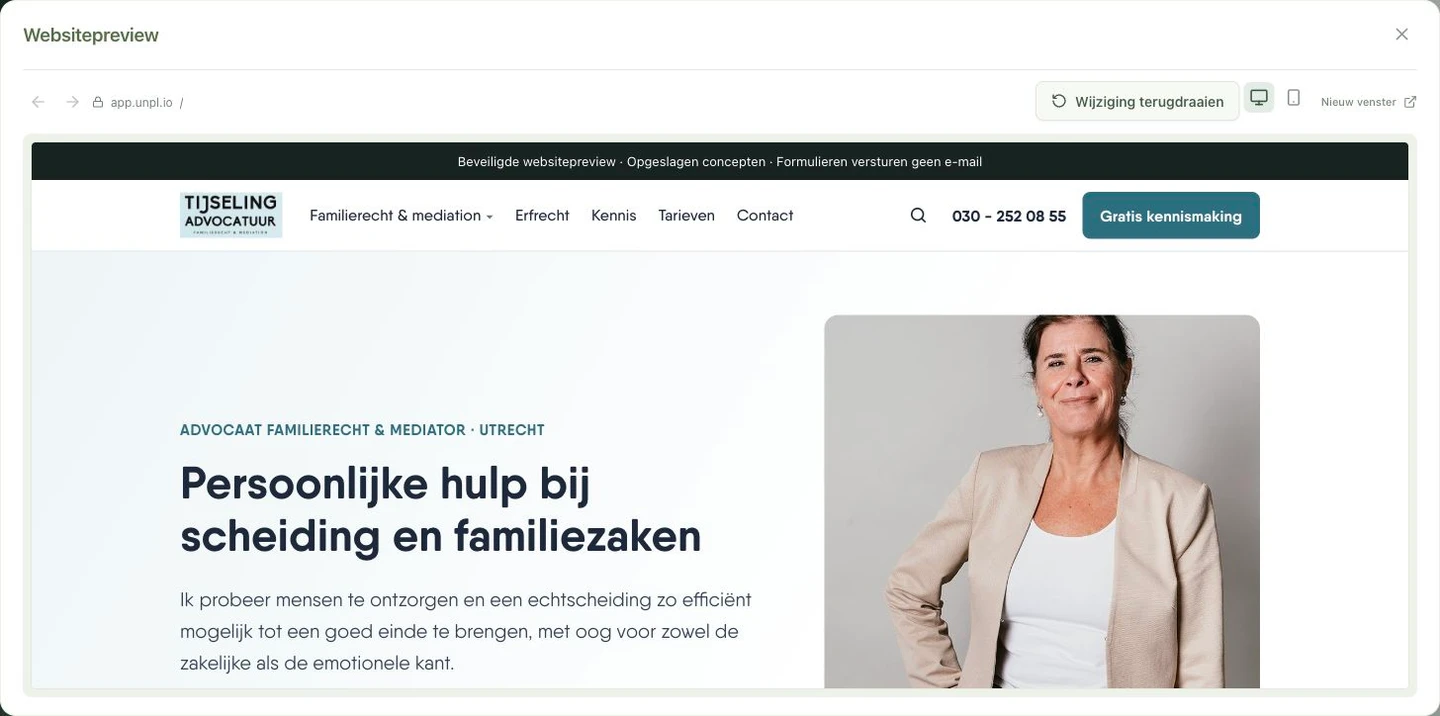
Saving a draft does not change your public website. Open the preview to see how the text fits the page. Switch between desktop and mobile views and navigate through the test pages. Forms in the test environment shown do not send real email.
The current AI editor changes text fields: page title, description, page content, SEO title and SEO description. This text chat does not change HTML, styling, images, URLs, forms or integrations. Larger changes to design, structure or functionality are scoped separately with Unplio.
Undo a change or apply it again
AI changes shows the saved requests for a page, with filters for active and reverted changes. Open the details to inspect an edit or undo it. The preview then offers a control for applying the saved text again.
Reapplying uses the existing change and does not require a new AI request. The result remains a draft. Approval and publication are separate steps, carried out by someone with the appropriate permissions. Team and Business let you divide content, SEO and publishing responsibilities.
What does Unplio manage after the switch?
Your public website now runs on Unplio’s managed environment. Log in to Unplio for everyday editing. A text change goes to your draft and private preview first; your live website changes only after approval and publication.
- Hosting, HTTPS and technical care: Unplio manages the website environment and build and publishing pipeline. You no longer maintain a public WordPress installation or plugin stack for this new website.
- Content and SEO: update text and search descriptions directly or with AI. Review the result before publishing. Team and Business let you divide responsibilities and publishing permissions.
- Version history and export: restore earlier publications and export your website-specific source, structured content and media.
- Technical search foundation: new Astro builds deliver readable HTML and Markdown, titles and descriptions, canonicals, appropriate structured data, a sitemap and llms files. Canonicals use the verified customer domain. You can deliberately mark pages noindex.
A new design, new functions or specialist integrations receive a separate agreement. Choose optional guidance if you want help reviewing or launching. Your domain stays yours; domain renewal, email hosting and any external services are separate from the website subscription.
What do migration and website management cost?
The trial is free, and automatic migration is included within your page limit. Personal guidance and custom redesigns are optional:
- Automatic migration: included. Inventory, a matching Astro design, content, supported images and a private preview, within your plan limit.
- Guided migration: from €595, one time. Personal review, agreed corrections and help launching, quoted in advance.
- Custom redesign: quoted individually. Bespoke components, a different structure, new copy or specialist functions.
The trial imports up to 50 pages. After confirmed payment, Solo supports 50, Team 150 and Business 500 pages. Optional services are excluding VAT and agreed in advance. Larger changes can also be scoped at €95/hour excluding VAT.
What happens to your Google search visibility?
We carry over the technical search essentials: retain existing URLs where appropriate, redirect changed addresses, preserve titles and descriptions, and check canonicals, the sitemap and internal links. You can review the private version before the domain switch.
Rankings can fluctuate while changed pages are recrawled and reindexed. We commit to a careful migration process, rather than guaranteed unchanged rankings. Google’s site-move guidance explains how URL changes should be prepared and monitored.
Review important pages in the private preview on desktop and mobile before launching. Static hosting provides a lighter foundation; actual loading speed also depends on images, scripts and any external services.
Which websites suit this approach?
Company websites, service pages, portfolios and blogs are the starting point. WooCommerce stores, membership portals, customer accounts and complex booking systems require separate assessment. Private customer data and custom plugin behaviour are not automatically transferred.
A static public website removes the WordPress-specific attack routes around PHP, the CMS database and plugins. Accounts, forms, domains, integrations and publishing still need protection. Managing that technical foundation is part of the service.
Common questions about trying Unplio and moving from WordPress
Do I need to take my WordPress website offline first?
No. You try Unplio in a separate environment. During a full migration, your current website stays live until you approve the new version and you switch the domain.
Do I need payment details for the trial?
No. You can try Unplio for 14 days without payment details. There is no automatic charge; you activate your subscription when you want to publish.
Is the trial site already my complete website?
After inventory and approval, your trial can import up to 50 pages. The private preview shows imported content, supported images and any functions requiring separate configuration. Larger imports require an activated Team or Business subscription, or a custom proposal above 500 pages.
Do I still need WordPress afterwards?
Not for the new Unplio website. Keep a backup of the old site first. Before cancelling your old hosting, check whether it still handles email, forms or other services.
Does my email move too?
Connecting your website does not automatically move email. Apply only the displayed DNS changes for the website and domain verification, and preserve existing email records. Arrange separate help for an email migration if needed.
When can I cancel my old hosting?
After your new website works on your own domain, important pages and functions have been checked and email still works correctly. Keep a backup first. Your existing hosting may contain services beyond the WordPress website.
What happens when the trial or AI allowance ends?
Editing pauses after the trial, while your saved draft and previews remain available. If only the AI allowance is exhausted and your 14 days are still running, you can continue editing text fields manually. You activate a paid subscription yourself.
Can I undo an AI edit?
Yes. You can inspect saved AI changes, undo them and apply them again. A draft change is separate from your public site. Restoring a published website version belongs to the separate publishing workflow.
Do I need GitHub skills to edit my website?
Your everyday work happens in Unplio. GitHub handles source code and version control, with technical setup managed for you. Your website-specific source, structured content and media can be exported. Moving elsewhere may require reconfiguring managed services such as forms.
Start by trying the workflow
Create an account and enter your website address. Review the page count and design before approving the import. Then try editing in your private preview. You decide when to pay and connect your domain.
Start your free 14-day trial · Discuss your existing website