MOVING FROM JOOMLA

A Joomla alternative with less upkeep.

Your website may mainly publish articles and explain your services, while its technical setup has grown into a list of extensions, templates and server requirements. Unplio is a managed alternative for a Joomla website whose public content matters more than its custom application features.

Private preview · No payment details · No automatic charge

WHEN A SWITCH MAKES SENSE

Why consider a Joomla alternative?

Reduce the maintenance work you own

Joomla has an extension update system, and major upgrades include compatibility checks. Someone still needs to understand the installed setup. With Unplio, hosting and the agreed technical care sit within the service.

Source: Joomla extension updates
Use the next rebuild to simplify

Joomla’s migration guidance calls out third-party extensions and templates as a source of complexity. Before moving, list what each extension does for visitors. Some functions need a replacement; others may no longer be needed.

Source: Joomla migration planning

Keep everyday publishing focused

In Unplio, an editor works on a page and reviews a draft. Team and Business let you divide content, SEO and publication tasks. A layout change or new business function is scoped before technical work begins.

Joomla and Unplio: what changes?

A comparison of two ways to manage a business website. Unplio is our own service; the right choice depends on the functions you actually use.

Scroll sideways to compare both approaches.

Scope, daily work and the practical trade-offs
What mattersJoomlaUnplio
Public websiteA CMS installation with a PHP and database stack.Prebuilt public pages on Cloudflare with protected management.
UpdatesCore, extensions, templates and hosting need a coordinated maintenance approach.Unplio manages the agreed hosting and technical foundation.
Content structureArticles, categories, menus and module positions.Agreed public pages mapped into a simpler website structure.
Custom featuresExtensions and custom components may deliver application behaviour.Functions beyond public content need assessment or a separate implementation.
A GOOD FIT

Who this is for

A company, professional association or service organisation using Joomla mainly for public articles, news and service pages. It suits a team that wants to stop coordinating CMS upkeep while retaining control over everyday content.

AN HONEST BOUNDARY

When to keep Joomla

Keep Joomla when custom components, detailed access rules, a member portal or business processes are essential and work well. Unplio is not a drop-in replacement for every Joomla extension.

BEFORE YOU MOVE

Your Joomla migration checklist

A page count is only the start. Bring the functions and visitor journeys into the review, including anything that cannot be read from a public page.

  • Articles, categories, menus and alternative routes to the same content.
  • Modules and components that appear on important pages.
  • Extension functions, including forms, directories and membership tools.
  • Public files, image paths and legacy URL patterns.
  • Current backups, domain ownership and email settings.
EVERYDAY CONTENT WORK

Give your team a clear editing workflow

An association has public news, service pages and a member area. The public site can be assessed separately. The member area stays in its existing system unless a separate replacement is designed, so private records are not treated as ordinary page content.

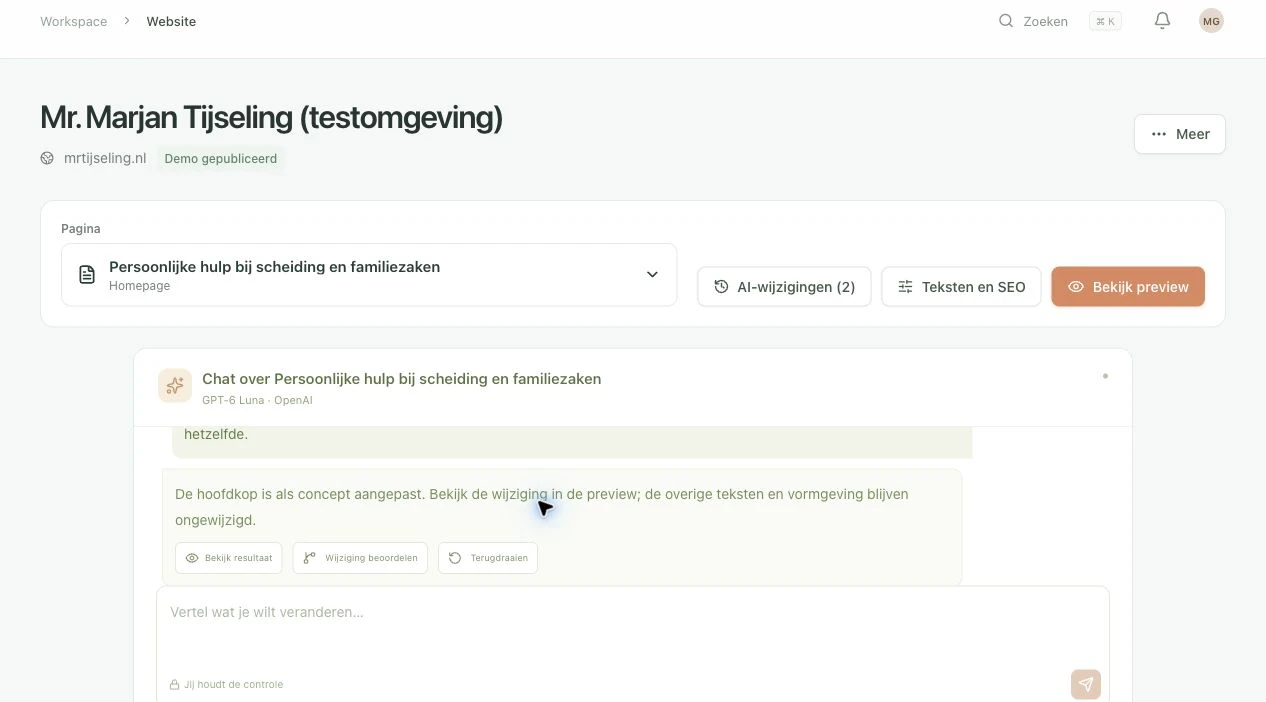
This is an example workflow, not a customer migration claim. Try the actual editor with a private site first. Select a page, make a focused text or SEO request, review the result and use change history if you want to undo it. Larger changes to structure or functionality are scoped separately.

Unplio editor showing a saved draft and preview controls in a private test workspace
The Unplio editor in a private test copy, shown in Dutch. This is not a screenshot of a migrated Joomla customer.
Explore AI-assisted editing
TRY BEFORE YOU SWITCH

Keep your current website live while you try.

  1. Create and verify your account

    Start without payment details. Your 14 days begin when the private preview is ready.

  2. Review pages and a matching design

    Try up to 50 public pages. Review the inventory and design before the full build; blocked or unsupported content may need guidance. An exact design copy is not guaranteed.

  3. Edit, preview and decide

    The trial includes 20 AI requests in total. Publication requires your own paid activation; there is no automatic charge. Confirm forms, integrations, URLs and email before changing your domain.

Start my free trial

A clear monthly plan. Extra help when needed.

Current monthly plans per website: Solo €39 · Team €79 · Business €149. Prices exclude VAT. Hosting, HTTPS and technical care are included; automatic migration covers supported standard content sites within your page limit.

Optional migration guidance starts at €595 one time, excluding VAT. Custom redesigns and specialist integrations receive a quote. Larger changes are available at €95/hour excluding VAT, with scope agreed in advance. Compare total cost and the work covered before assuming a saving over Joomla.

We check agreed URLs, redirects, metadata and search essentials. Search rankings can fluctuate after a move. Static hosting provides a light foundation; speed depends on the final design, media and scripts and should be measured.

See all plans and migration details

Questions about moving from Joomla

Do my Joomla extensions come with the site?

Their visible output can inform the content inventory, but the extensions themselves do not run in the static site. Required functions need replacement or a continuing integration.

Can I keep article URLs and categories?

We map the important public routes, preserve suitable URLs and plan redirects for changed ones. Category structure and duplicate routes are checked during the migration.

Does leaving Joomla remove every security risk?

No. It removes the public Joomla, PHP and CMS database layers from the rebuilt site. Accounts, forms, domains, integrations and publishing still require protection.

Check the platform documentation

Comparison reviewed on 21 November 2026 against the official sources below. Features and export options can change; confirm the current position before committing to a migration.

Find out whether your Joomla site fits.

Try the editor and private preview first. Have a complex setup? Share what needs to keep working before planning the switch.