MOVING FROM WEBFLOW

A Webflow alternative for everyday updates.

Your Webflow site already has a visual identity. Most weeks, you need to update a service, publish a project or improve a search description. Unplio is for businesses that want those tasks in a focused editing workflow, with managed hosting and a review before publication.

Private preview · No payment details · No automatic charge

WHEN A SWITCH MAKES SENSE

Why consider a Webflow alternative?

Separate content work from design work

Let the people who know the business update its content. In Unplio, everyday text and SEO work starts with a selected page and a focused instruction. Larger layout changes remain a separately scoped design task.
Plan the move beyond a code export

Webflow’s code export does not include working CMS content, form processing or site search. Those parts need their own migration plan. We check the public pages and required functions before proposing a replacement.

Source: Webflow code export

Compare workflows, not just AI labels

Webflow already offers AI-assisted copy editing. Choose Unplio for its managed migration and focused day-to-day workflow, after trying it with your own content; AI alone is not a reason to switch.

Source: Webflow AI

Webflow and Unplio: what changes?

A comparison of two ways to manage a business website. Unplio is our own service; the right choice depends on the functions you actually use.

Scroll sideways to compare both approaches.

Scope, daily work and the practical trade-offs
What mattersWebflowUnplio
Design controlA visual design environment for building and changing layouts.A matching Astro design with daily content editing; custom layout work is scoped separately.
CMS contentCollection content needs separate treatment when exporting code.Public content is inventoried and checked in a private preview before launch.
Forms and searchHosted services are not carried over as working services in code export.Standard contact forms and the enquiries inbox are included; search and specialist functions are assessed separately.
Daily changesDesign and content tools within Webflow.Focused AI instructions, direct text fields, preview and change history.
A GOOD FIT

Who this is for

A service business, consultancy or studio whose website mainly explains its work, publishes projects and generates enquiries. The best fit is a team that values content control more than frequent visual experimentation.

AN HONEST BOUNDARY

When to keep Webflow

Keep Webflow if your team actively uses its visual design environment, complex interactions or hosted features and is happy with that workflow. Unplio does not recreate the Webflow Designer inside its editor.

BEFORE YOU MOVE

Your Webflow migration checklist

A page count is only the start. Bring the functions and visitor journeys into the review, including anything that cannot be read from a public page.

  • Collection pages and the relationships your visitors use.
  • Interactions, animations and reusable components that matter to the design.
  • Forms, site search and any third-party scripts.
  • Translated pages, their URLs and language links.
  • The person who owns the workspace, domain and original assets.
EVERYDAY CONTENT WORK

Give your team a clear editing workflow

A studio wants to replace a project description and its search snippet. Its editor chooses the project page, requests a focused rewrite, checks the preview and lets the authorised publisher release it. Redesigning the project grid is a separate change.

This is an example workflow, not a customer migration claim. Try the actual editor with a private site first. Select a page, make a focused text or SEO request, review the result and use change history if you want to undo it. Larger changes to structure or functionality are scoped separately.

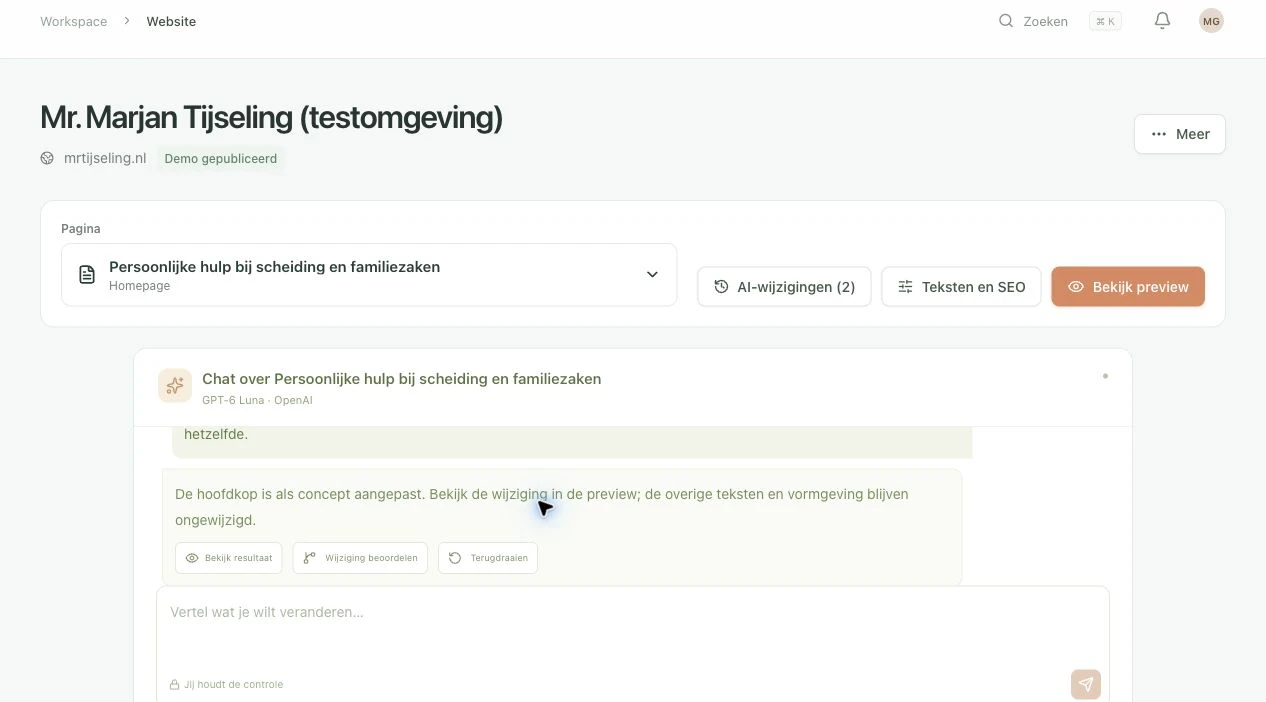
Unplio editor showing a saved draft and preview controls in a private test workspace
The Unplio editor in a private test copy, shown in Dutch. This is not a screenshot of a migrated Webflow customer.
Explore AI-assisted editing
TRY BEFORE YOU SWITCH

Keep your current website live while you try.

  1. Create and verify your account

    Start without payment details. Your 14 days begin when the private preview is ready.

  2. Review pages and a matching design

    Try up to 50 public pages. Review the inventory and design before the full build; blocked or unsupported content may need guidance. An exact design copy is not guaranteed.

  3. Edit, preview and decide

    The trial includes 20 AI requests in total. Publication requires your own paid activation; there is no automatic charge. Confirm forms, integrations, URLs and email before changing your domain.

Start my free trial

A clear monthly plan. Extra help when needed.

Current monthly plans per website: Solo €39 · Team €79 · Business €149. Prices exclude VAT. Hosting, HTTPS and technical care are included; automatic migration covers supported standard content sites within your page limit.

Optional migration guidance starts at €595 one time, excluding VAT. Custom redesigns and specialist integrations receive a quote. Larger changes are available at €95/hour excluding VAT, with scope agreed in advance. Compare total cost and the work covered before assuming a saving over Webflow.

We check agreed URLs, redirects, metadata and search essentials. Search rankings can fluctuate after a move. Static hosting provides a light foundation; speed depends on the final design, media and scripts and should be measured.

See all plans and migration details

Questions about moving from Webflow

Can I move a Webflow CMS site?

Public content pages can be assessed for migration. Collections, references, forms and search need an inventory first. A code export by itself is not a complete CMS migration.

Will my animations look exactly the same?

An exact copy is not guaranteed. Important interactions are listed before the rebuild and checked in the preview. Specialist animation work may need a separate quote.

Is Unplio always cheaper than Webflow?

No. Compare the complete cost of the plan, migration guidance, external services and any custom work against your current invoices and team time.

Check the platform documentation

Comparison reviewed on 21 November 2026 against the official sources below. Features and export options can change; confirm the current position before committing to a migration.

Find out whether your Webflow site fits.

Try the editor and private preview first. Have a complex setup? Share what needs to keep working before planning the switch.